

BARISTUNO · BY BARISTA IN PAJAMAS
Everything a home barista needs.
Baristuno is a private coffee system built around the daily cup. It remembers recipes, fresh coffee, equipment, optional brewing water, grind measurements and taste—then turns that history into useful starting points, careful experiments and clear next steps.
Who's behind it
Baristuno is made by Barista in Pajamas: a coffee channel about making genuinely good coffee at home without pretending you need a café budget to do it. Espresso machine reviews, recipes, dial-in guides, and the occasional Persian-inspired drink that came straight out of a family kitchen.
It's a one-person operation: the videos, the recipes, and this app. Baristuno began as a grind particle analyzer, and the journal grew around it. Then the journal became a daily workflow, a recipe book, a coffee inventory, an experiment system, and a careful way to share useful recipes. The principle stayed the same: a number matters only when it helps make the next cup better.
The daily coffee loop
This is the centre of the app. Start from Today, log a cup quickly, or use the larger guided timer when the recipe needs attention. Every entry can become a saved recipe, be edited, duplicated, searched, compared, or brewed again. Coffee lots track roast age, remaining weight and cost while offline capture keeps the routine working without a perfect connection.
Capture what mattered
Method-specific fields keep the form relevant. Link a grind report, My Brewing Water, scale weight or TDS reading when it helps; leave it out when it does not.
A library you can return to
Saved recipes, best observed starting points, searchable brew history, coffee-lot freshness, bag consumption, cost per cup, grinder calibration and a real SCA brewing control chart all grow from the same records.
Useful intelligence
Brew IQ compares selected cups; experiment mode keeps every control fixed except one; best-recipe views find strong observed baselines by coffee and method. Optional brewing-water context, grinder-setting curves and connected Learn articles help explain the pattern instead of merely ranking it.
Recommendations state their evidence count and confidence. They describe patterns in your own records, never pretend that correlation proves cause, and stay quiet when the history is too thin.
An ecosystem, only when you want it
The private daily workflow comes first. Everything outside it is optional and can be used independently.
The Commons is intentionally quiet. It has useful public recipes, copy-to-library and reporting—not comments, follower counts, direct messages, public brew ratings, leaderboards or automatic social profiles.
The Grind Lab
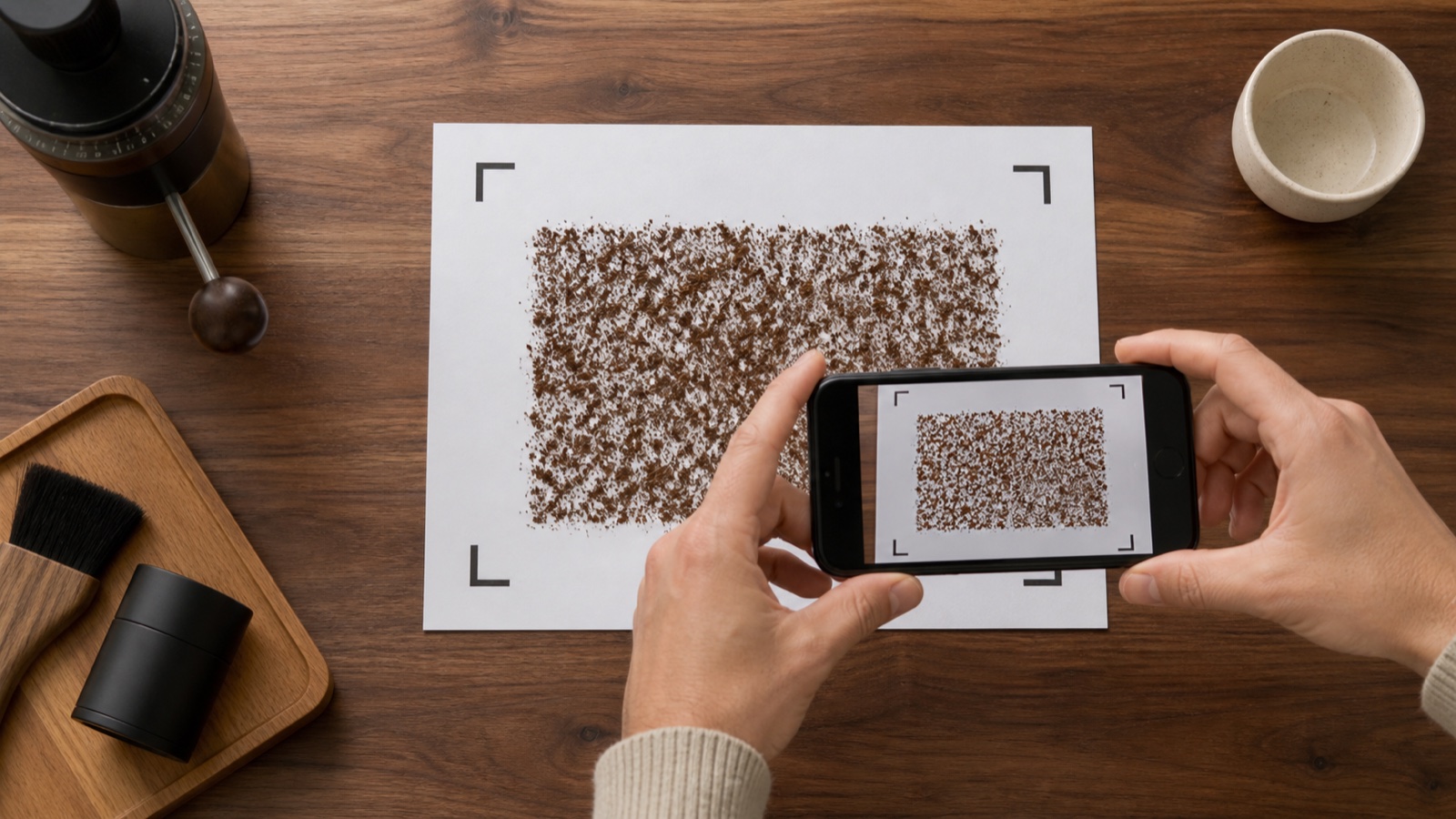
Built into the journal for when the cup is off and you suspect the grinder. Print the free calibration mat, sprinkle a sample, take one photo, and you get a real particle-size distribution measured in microns. Link that reading to a brew and Brew IQ can tell you whether a bad cup was your recipe or your grind.
How the measurement works
The app finds the four corner marks, uses them to correct the camera angle, and rescales the image so every pixel is exactly 50 microns across. Then it separates each individual ground from the paper, measures its area, and converts that to a diameter. A few hundred to a few thousand particles later, you have a distribution.
What you get
Volume distribution with a cumulative curve: the shape tells you as much as the numbers.
Brew method match
Plus a flavour projection radar: clarity, sweetness, body, brightness, balance, and the extraction risks worth watching.
Private by default, explicit when public
Your private journal syncs to your account, while Brew IQ and grind-photo processing run in your browser. Original grind photos are never uploaded; saving a reading stores the measurements and a small corrected thumbnail, not the original. Import files are read locally, connected readings stay in the current page until you save the brew, and the app carries no ads or behavioural tracking scripts.
Recipes reach the public Commons only when you select one, choose the credit, confirm the public action, and publish it. Private-link sharing contains only the information encoded in that link. Your journal never becomes a public profile.
One thing does get pooled, and you should know about it. When you save a grind analysis, a short anonymous row is also written to a shared table: the grinder model, the dial setting, D50, fines, span, the particle count, and when it was recorded. Nothing else, and nothing linking it to you: no account id, no email, no photo, no coffee. That pool is what makes a setting-to-microns reference possible, so that eventually you can look up a grinder you don't own and see roughly where to start. If you'd rather not contribute, don't save the reading: the analysis and its full report still work without an account at all.
What it is, and isn't
The Grind Lab is an estimation tool, not a laboratory instrument. Phone cameras can't resolve particles below roughly 100 microns, so true fines are undercounted and that figure should be read as a floor rather than a truth. Absolute numbers may run high compared to laser diffraction. What it does genuinely well is comparison: the same grinder, one click apart, same lighting, same prep. That's the dial-in question, and it answers it reliably.
The flavour and brew-method outputs are projections computed from particle geometry alone. Roast level, bean density, water, and recipe all move the cup and none of them are measured here. Treat them as a tendency to check against your palate, never as a verdict. Sample preparation moves your numbers more than anything in the software: a thin, well-separated sprinkle beats a careless pile every time, because clumped grounds read as one big particle.
Brew IQ and recommendations have a different limit. They find patterns in the brews you logged, which is not the same as finding universal rules about coffee. Small samples and correlations are presented with confidence labels. They are good ways to pick the next experiment, not substitutes for running it.
Device and import support depends on what another product exposes. Manual capture remains the reliable fallback; a listed file format or browser connection does not guarantee that every app version or proprietary device will map perfectly.
Credit
Method adapted from the open-source work of Jonathan Gagné.